Get in Touch with GUANGQI



Before choosing a light
- Match detection to walking, small movements or seated work.
- Choose the power source and indoor or outdoor location first.
- Separate the light’s output from the sensor’s coverage.
- Match the controller to the actual LED load and control interface.
A motion sensor light should detect the activity you want illuminated and keep the light on through normal pauses. Match its detector, timer and light fixture to that task. This guide compares indoor and outdoor lighting formats, then shows how to test coverage and calculate the cost of longer delays.
A motion sensor light switches or changes its output when a detector senses movement. Choose it by occupied activity, coverage, power supply and control mode. Test both entry detection and quiet occupancy before buying a full installation.
Key points
- A wider detection field can create unwanted triggers without solving quiet-occupant shutoff.
- Vacancy mode requires manual-on; a daylight threshold decides whether automatic-on is needed.
- A short timer reduces unnecessary on-time but can interrupt seated work.
- Battery access and LED-driver compatibility can matter more than small electricity savings.
What is a motion sensor light?
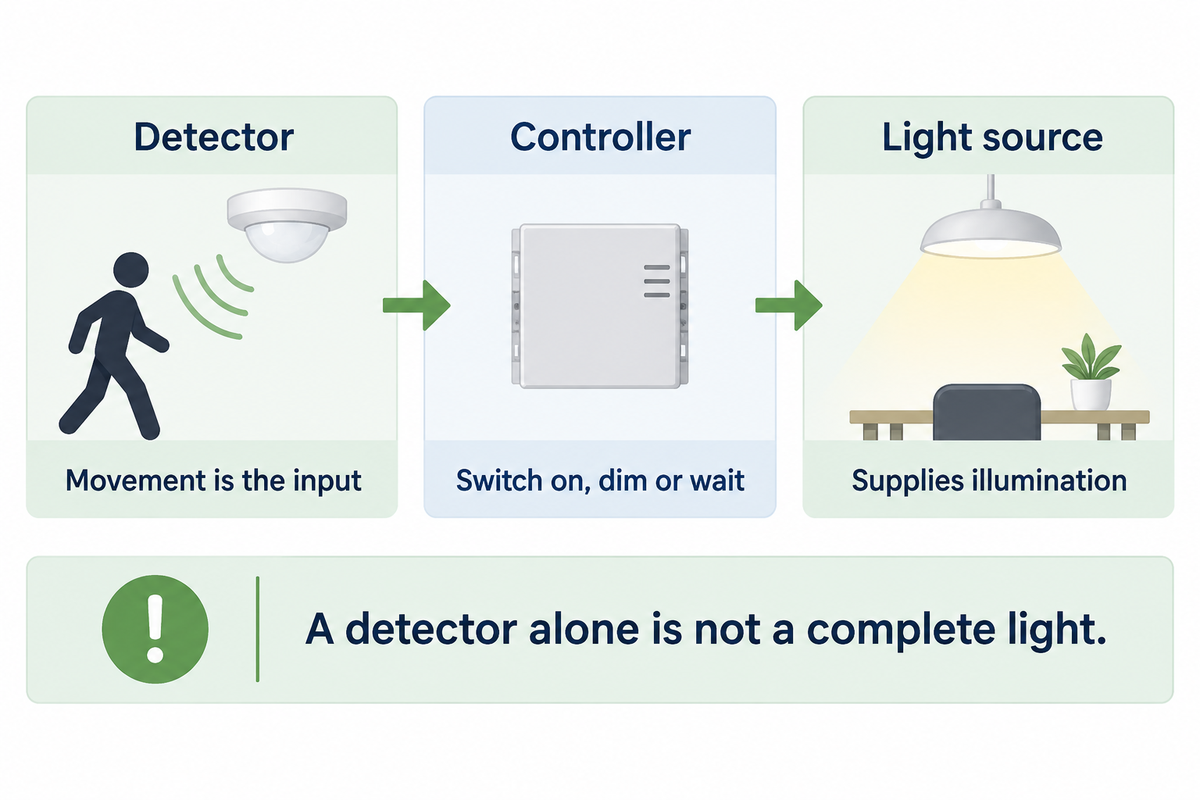
A motion sensor light refers to a combination of a detector, a controller and a light source. Movement is the input. Movement provides the input; the controller decides whether to switch on, dim or wait. The fixture supplies the illumination. These functions can be in one unit or in different units and, therefore, buying a motion detector doesn’t mean a complete light source is purchased.
Think of the detector as a doorbell for the lighting controller. A signal starts a timed action, but the signal doesn’t describe the activity of all the persons. Therefore, a motion activated lamp may work well in a cupboard and may not work above a desk, even if both the areas fall within the detection range of the lamp.
The U.S. Department of Energy’s review of occupancy-sensor testing distinguishes sensing performance from the control system’s response. When evaluating products, consider what’s detected and the controller’s response, as well as the level of illumination on the task. A higher lumen output can’t compensate for a detector that’s placed behind a partition.
For a replacement project, establish which part is failing before changing the fixture. A dark work surface may need a different light distribution. A lamp that turns off during work needs attention to detection, placement or control timing.
Energy efficiency relies on a combination of on-time performance and lamp efficacy. Compare the sensor’s range and angle with the actual approach route, rather than assuming that a larger field saves more energy.
Choose an indoor or outdoor light format
Choose the format appropriate to the location and maintenance access. A rechargeable strip is suited to a small dry closet, while an outdoor security light requires an appropriate environmental rating and useful coverage of the approach. For frequently used commercial spaces, a wired fixture with a serviceable sensor can avoid repeated battery visits and simplify control integration.
Can I use motion sensor lights indoors?
Yes. Indoor use includes closets, cabinets, corridors and shared service rooms. Battery operated or stick-on lights can provide hands-free lighting where a new circuit would be inconvenient. At a desk or meeting table, consider small-movement detection and manual control as carefully as the automatic-on function; walking past the entrance is an incomplete test.
One example of a convenience light is Good Earth Lighting RE1254-WHG-06LF1, a 6-inch rechargeable strip light, with 100 lumens. Options are 3000K or 5000K, with a 100 degree detection field covering up to 15 feet. It’s a dry indoor lighting product and isn’t meant to be used to light an exposed porch.
Motion sensor outdoor lights need a detection boundary that matches the outdoor space. A motion sensor wall light can be a good option to light an entryway without lighting the entire driveway. Compare a motion sensor flood light with a wall fitting for the garage door; an adjustable flood head changes the aiming options.
Some lights feature adjustable heads that let the installer aim light across a larger area. Motion sensor security lights need precise detector aiming: a bright LED security fitting still needs to distinguish the intended arrival route from street traffic. Check both functions when evaluating LED outdoor fixtures.
Solar powered lighting changes the charging and maintenance arrangement. Compare site conditions for a wired-power option with an off-grid option; convenient mounting locations aren’t necessarily charging-system locations. Indoor lighting has a different consideration when a rechargeable unit must be removed for charging.
Motion-to-Light Fit Matrix
Use the matrix to shortlist a candidate format. Perform the acceptance check in the last column. Verify the installed product with doors, partitions and furniture in their actual positions.
| Application | Useful starting format | Control priority | Acceptance check |
|---|---|---|---|
| Closet | Battery powered strip | Entry activation | Open the door and reach the back shelf |
| Under-cabinet task | Rechargeable task light | Accessible charging | Work without repeatedly waving at the sensor |
| Hallway | Wired ceiling or wall fixture | Approach coverage | Walk the full route in both directions |
| Desk | Wired controlled fixture | Small-movement detection | Read and type in the normal seated position |
| Meeting room | Sensor-and-fixture system | Manual-on and quiet occupancy | Hold a meeting with the usual furniture |
| Shared restroom | Commercial occupancy control | Partition coverage | Check every occupied stall position |
| Porch | Outdoor wall fitting | Daylight inhibit and approach | Approach from the path and test at dusk |
| Driveway | Outdoor floodlight | Light aiming and boundary control | Separate intended arrivals from street traffic |
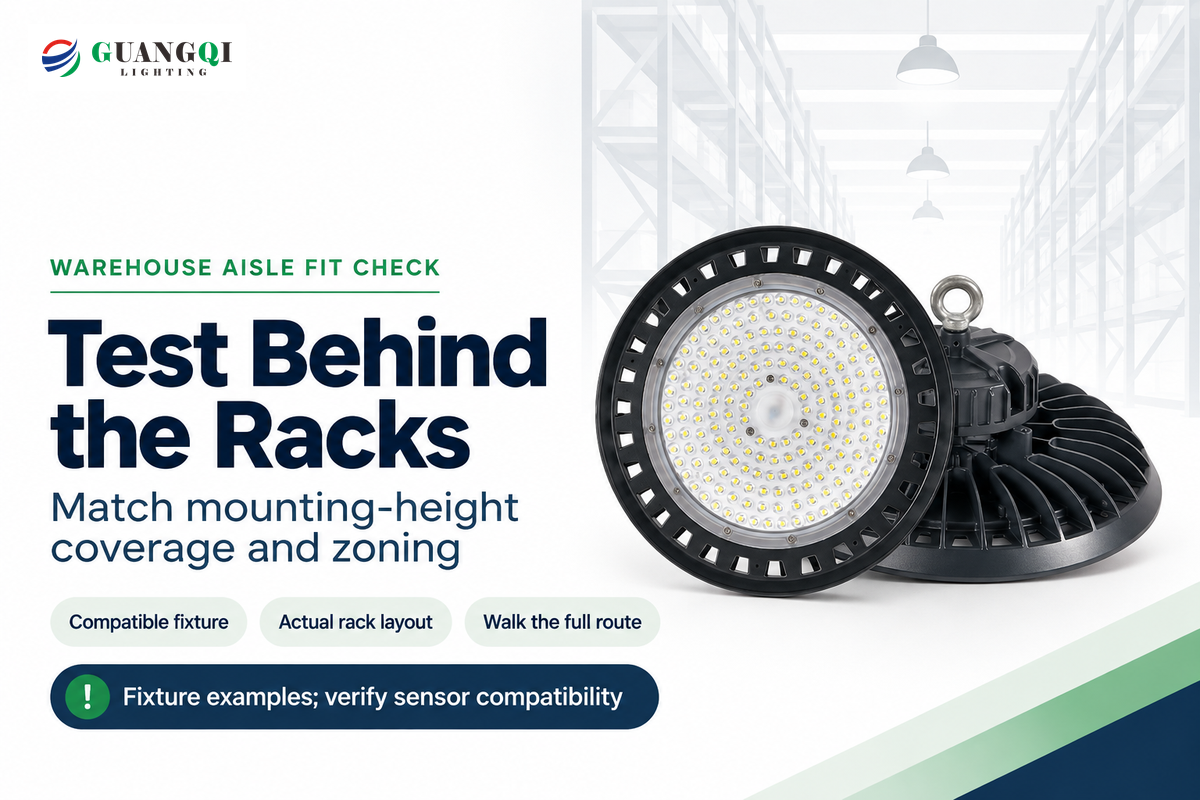
| Warehouse aisle | Compatible commercial LED fixture | Mounting-height coverage and zoning | Traverse behind the installed racks |
When reviewing quotes, procurement should have clarified the format of what’s being purchased. The installation and maintenance scopes of a security flood light are different from those of a small rechargeable light. For exterior styling, review the available outdoor wall-light formats after defining the area that needs illumination. Choose styles to suit the building after settling detection and light distribution; architectural focal points may need separate lighting.
PIR, microwave or ultrasonic: which detection method fits?
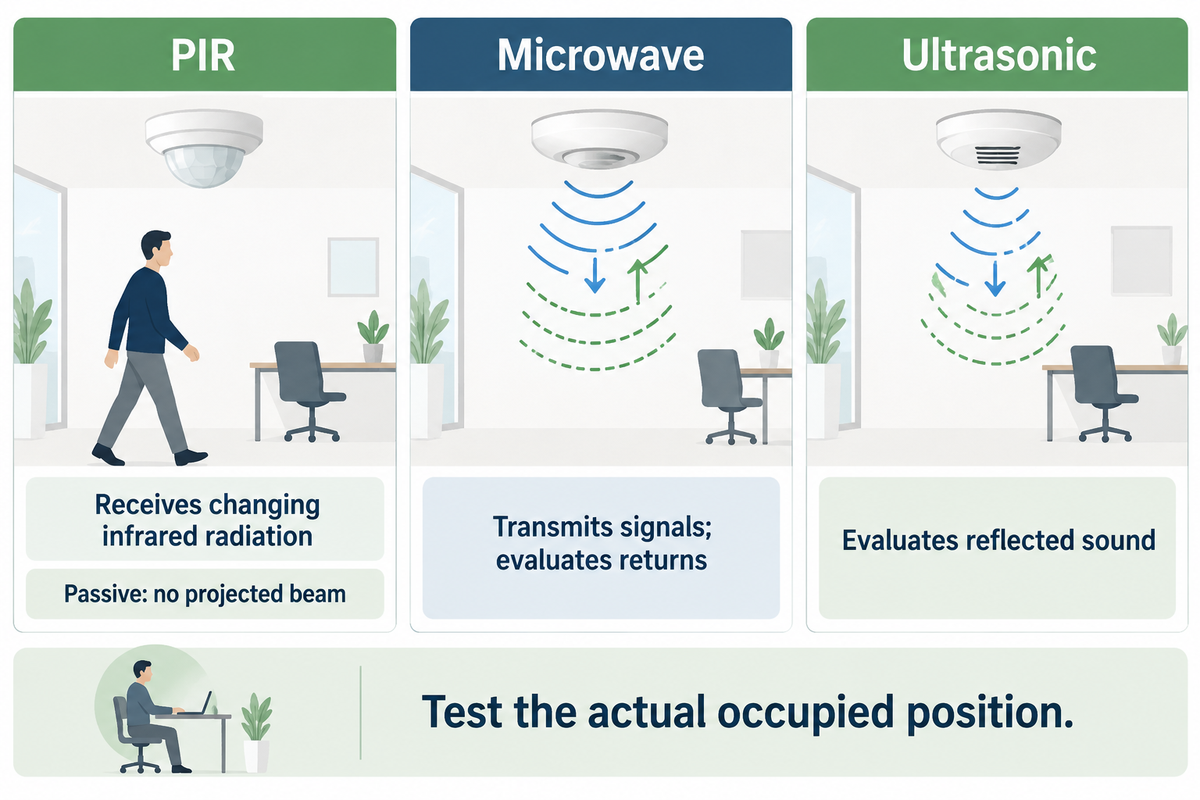
PIR detects changes in received infrared radiation, while microwave and ultrasonic sensors transmit signals and evaluate changes in their returns. Choose the technology based on movement, obstructions and unwanted activation. A clear approach route may warrant the use of a PIR sensor. A PIR motion sensor may suit a clear approach route; a quiet occupied room needs a tested small-movement response, regardless of the technology label. Choose a technology based on the situation and need.
PIR is passive: PIR doesn’t project an infrared beam across the room. It views the room and coverage can be blocked by partitions, furniture and the body of the occupant. Coverage diagrams should distinguish major movement from minor movement at the intended mounting height.
PNNL’s 2022 presence-detection study found that all 11 tested PIR systems passed its minor-motion test, and 7 passed its micro-motion test. Those results came from defined seated tests with sensor visibility and timing conditions. For seated work, test the actual chair position: office partitions can interrupt the detector’s view.
Ultrasonic sensing utilizes changes in reflected sound. A dual-technology controller combines sensing methods, but its logic matters: the conditions for turning on can differ from those for keeping the light on. Ask for that operating sequence rather than assuming that two technologies always produce better results.
The Hytronik HC005S/I is an example to illustrate the importance of understanding the context of microwave sensors. Its guide lists 5.8 GHz operation, a maximum 10 m detection diameter at a 3 m mounting height, and a maximum installation height of 5 m. It’s an IP20 indoor control supplied at 220–240 V AC, 50/60 Hz. Due to the supplied voltage range, it can’t be recommended for a 120 V U.S. retrofit as a default microwave motion sensor.
A microwave sensor label doesn’t provide any dependable information about a motionless occupant or a wall’s effects on the detector zone. A proposal to replace a test at the actual desk, rack or doorway with a maximum radius should be rejected. The facility manager requires detector coverage of the occupied task, and the neighboring property requires freedom from nuisance illumination.
Occupancy, vacancy and daylight controls do different jobs
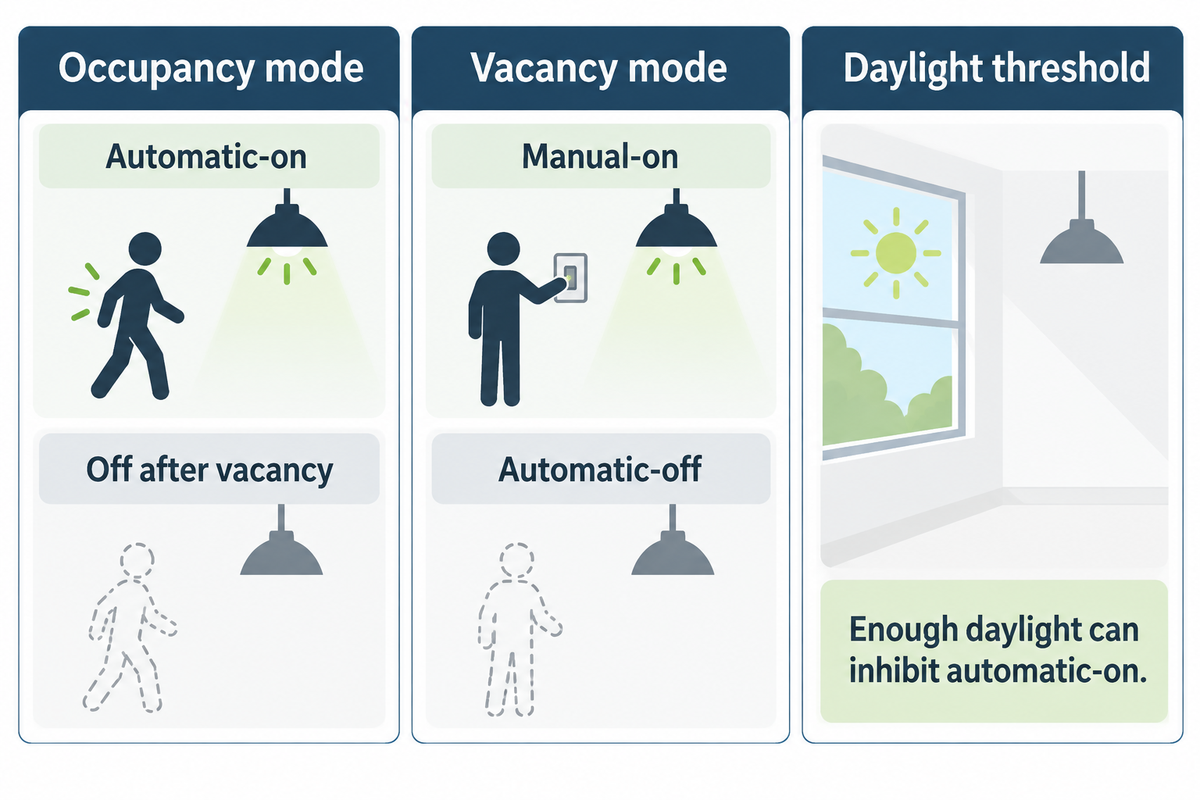
In occupancy mode, lights normally turn on automatically and turn off after vacancy. Lights turn on manually and turn off automatically in vacancy mode. A photocell or daylight threshold can inhibit an automatic on when ambient light is sufficient. These are separate control choices, so an outdoor motion sensor light need not operate as a dusk to dawn light.
Occupancy: automatic-on
- Use for hands-full entry into a storage area.
- Limit the detection zone to the intended activity.
- Apply daylight inhibit when adequate daylight is available.
Vacancy: manual-on
- Use when occupants should choose whether light is needed.
- Provide an accessible, clearly understood switch.
- Retain automatic-off after the space becomes vacant.
Do motion lights only work at night?
No. Motion lights can operate in daylight, if their controls are set to permit it. A dusk to dawn sensor responds to ambient light, while motion detection responds to movement. A combined control may require both movement and darkness. Check the selected mode before diagnosing a daytime non-response as a failed sensor.
A dusk to dawn motion sensor arrangement combines these inputs. Motion sensor lights activate only when the programmed conditions are met. Many motion sensor lights therefore remain dark during a daylight walk test even though detection is working.
For a daylight-filled office, manual-on avoids switching on electric lights whenever someone enters. An automatic-on control may function in a dark stockroom. A dusk to dawn security scheme may instead need low-level brightness all night and full brightness when motion is detected. This dual brightness sequence will require compatible dimmable hardware and specific programming. Adjustable brightness and motion switching are separate features.
Project rules can place restrictions on these choices. California’s 2025 NRCA-LTI-02-A acceptance-test reference gives a maximum 20-minute final time delay for the applicable nonresidential, hotel/motel and multifamily common-area controls. This time delay is for the specified jurisdiction and application. Setting options for a product don’t determine the settings that can be used for a project.
Set the hold time and sensitivity for real use
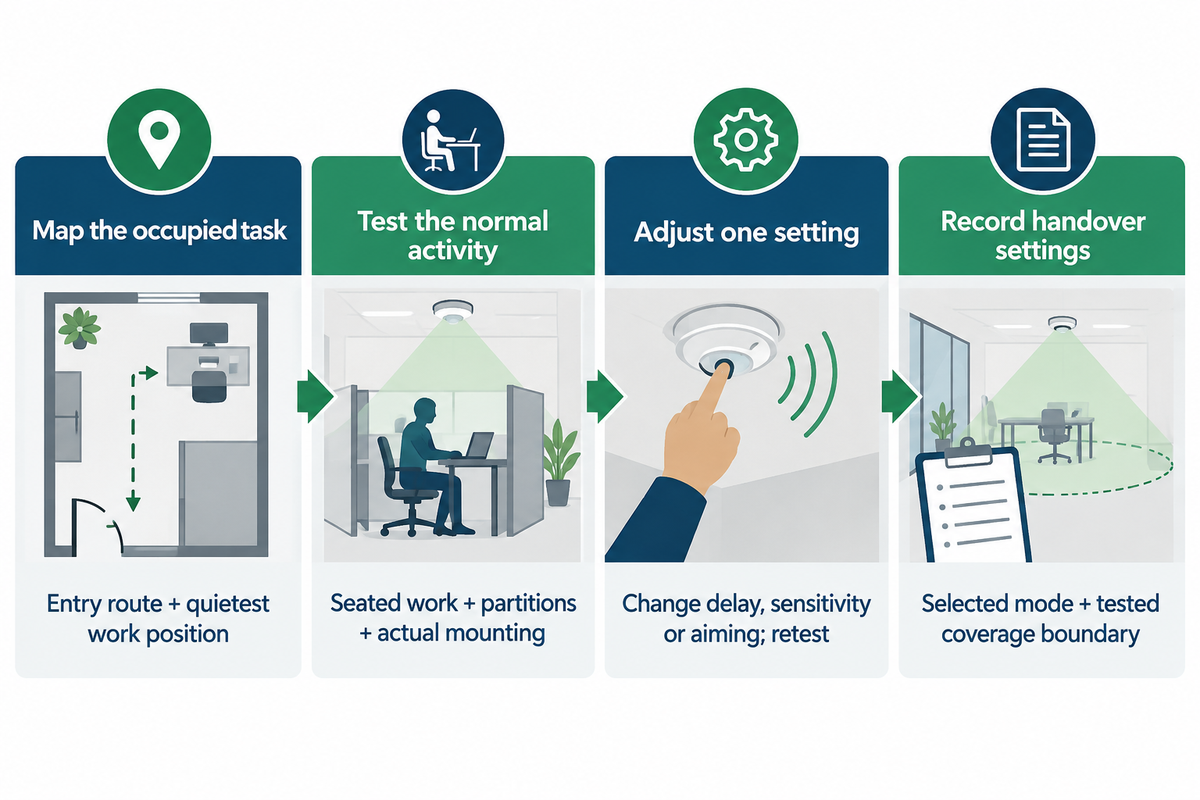
Set the hold time long enough to cover the natural pauses in movement, and test the occupied task and the empty room. Increasing sensitivity may detect smaller activity but can also increase unwanted triggers. Follow the commissioning instructions provided by the manufacturer and stick to the project limits; change one variable at a time, and results will be more interpretable.
How long will a motion sensor light stay on?
A motion sensor light stays on for its configured delay after the last qualifying detection, unless another control mode changes that sequence. Repeated movement normally resets the timer. Available delays differ substantially: a fixed-delay convenience strip and an adjustable commercial sensor cannot be assigned one universal switch-off time.
The FAQ on the Decora sensor family by Leviton names 30 second, 5 minute, 15 minute, and 30 minute delays. By comparison, the Good Earth strip described above switches off after 20 seconds without detected movement. Decide on the product based on the required activity. A short, fixed delay can be inappropriate for a task with longer pauses.
“A long timeout period saves less energy but avoids turning lights off during periods of intermittent inactivity.”
For a trial, use a 5-minute delay only where the product and project permit it. Sit in the least visible work spot and wait for the delay to expire. Leave the space and confirm the expected switch off. Adjust the sensitivity only after checking the coverage boundary. Test daylight mode separately. Since bright conditions can prevent a valid motion event from producing light, test it in different lighting conditions.
- Map the occupied task. Mark the entry route and the quietest working position.
- Test the normal activity. Include seated work, partitions and the actual mounting location.
- Adjust one setting. Change delay, sensitivity or aiming individually and repeat the affected test.
- Record the handover settings. Leave the facility team the selected mode and the tested coverage boundary.
What does a motion sensor light cost to buy and run?
A good comparison includes fixture, sensor, installation, commissioning and maintenance costs, and electricity. Ask for quotes for the same supply voltage, environmental conditions and control sequence. A small battery-powered light eliminates the need for wiring, but charging visits may exceed the cost of providing power. A wired installation requires a baseline to prove savings.
Delay-Cost Ladder
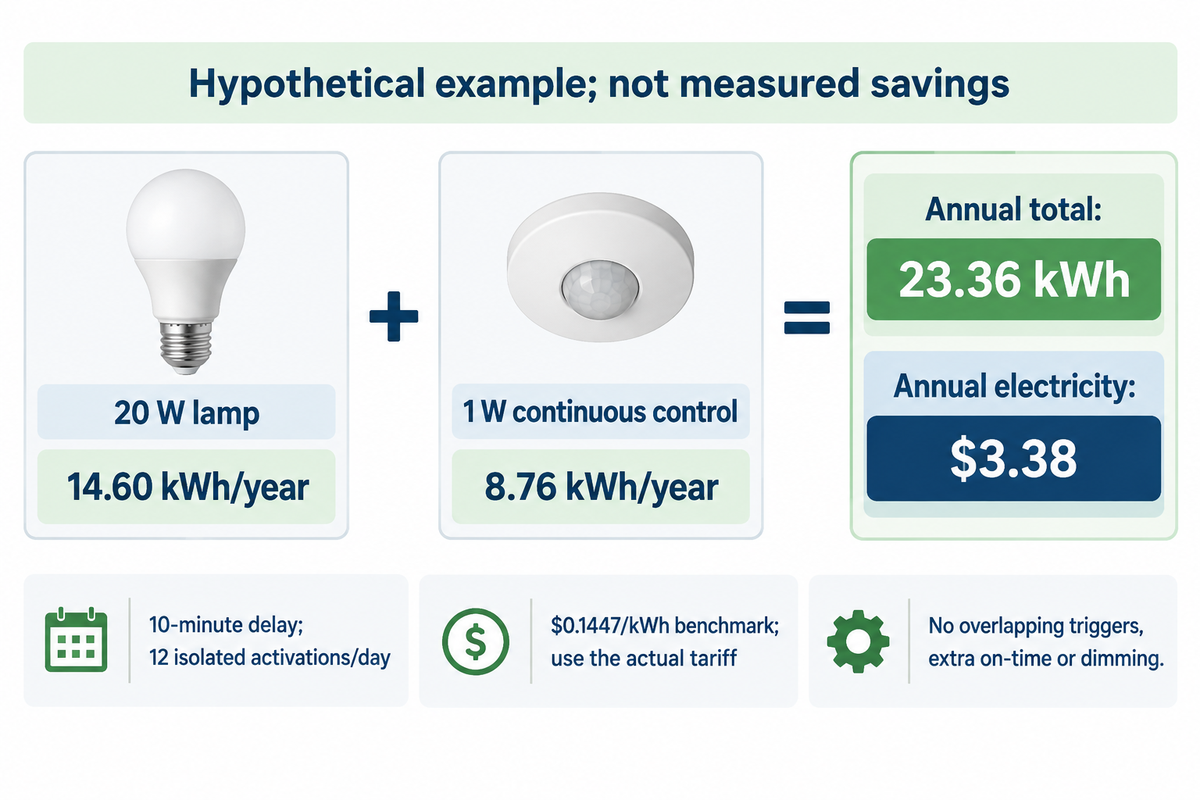
Consider an example with a 20 W LED lamp, a separate 1 W continuously powered controller and 12 isolated activations each day. Assume no overlapping triggers, no additional occupied on-time and no dimming. Use $0.1447/kWh, the EIA’s preliminary U.S. commercial average for August 2026, as the billing benchmark; replace it with the project’s actual tariff.
| Delay per activation | Lamp on-time per day | Lamp + control energy | Annual electricity |
|---|---|---|---|
| 20 seconds | 0.067 hours | 9.25 kWh | $1.34 |
| 30 seconds | 0.10 hours | 9.49 kWh | $1.37 |
| 1 minute | 0.20 hours | 10.22 kWh | $1.48 |
| 2 minutes | 0.40 hours | 11.68 kWh | $1.69 |
| 5 minutes | 1.00 hours | 16.06 kWh | $2.32 |
| 10 minutes | 2.00 hours | 23.36 kWh | $3.38 |
| 15 minutes | 3.00 hours | 30.66 kWh | $4.44 |
| 20 minutes | 4.00 hours | 37.96 kWh | $5.49 |
| 30 minutes | 6.00 hours | 52.56 kWh | $7.61 |
For the 10-minute row, lamp energy is 0.020 kW × 12 × (10/60) hours × 365 = 14.60 kWh/year. Control energy is 0.001 kW × 24 hours × 365 = 8.76 kWh/year. The sum of these energies, multiplied by the cost per kWh, yields the cost for the year.
Compare that case with a manually switched lamp left on for 8 hours daily: 58.40 kWh/year costs $8.45 at the same rate. Against that baseline the example saves $5.07/year. Against an efficient 2-hour manual schedule, the sensor case costs $1.27/year more. Longer occupancy and overlapping triggers change both comparisons; the timer alone can’t establish payback.
Hidden cost bottlenecks: finance needs the existing on-time and tariff, procurement needs matched installation scope, and maintenance needs access to batteries and replaceable controls. Count a service or charging visit in the cost model. A rechargeable unit in a hard to reach place would require a visit for charging or servicing. If separate components would create troubleshooting visits, a request for a compatible driver and sensor combination should be made.
What are the downsides of using motion sensor lights?
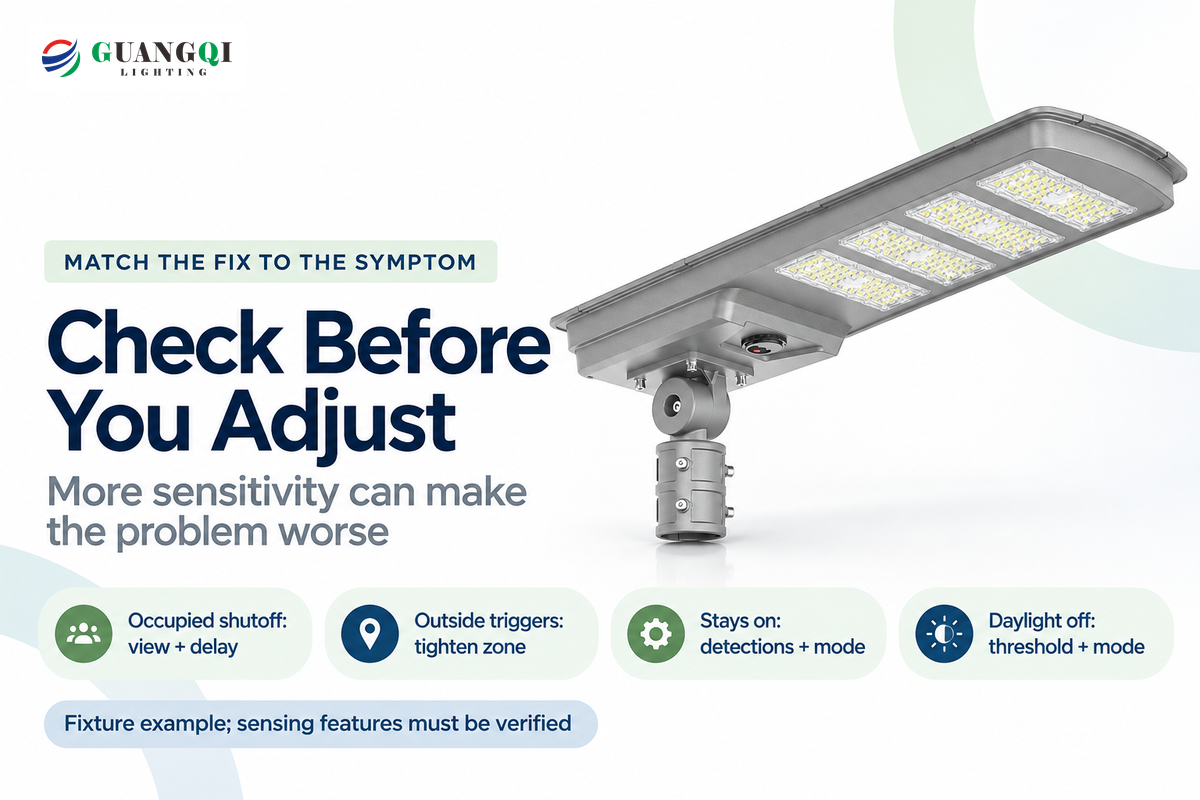
The main drawbacks are unwanted activation, shutoff during quiet occupancy, standby consumption and maintenance access. Match the treatment to the symptom. A light that misses a seated worker needs a coverage and timeout test; a light triggered by traffic needs a tighter zone. Raising sensitivity for either problem could potentially make the situation worse.
Electricians discussing wall-switch occupancy sensors describe office cubicles and restroom stalls where occupants lose light while remaining in the room. Use these positions to test motion detector lights. Treat the accounts as individual occurrences and not a failure rate.
- Turns off while occupied: check the sensor’s view of the task, then the delay and small-movement response.
- Turns on outside the intended area: reduce the zone through aiming, masking or supported sensitivity settings.
- Stays on after departure: check repeated detections, manual override and any scheduled or low-level mode.
- Won’t turn on during daylight: test the photocell threshold and operating mode.
A security light can illuminate an arrival or make potential intruders more visible, but illumination does not guarantee deterrence. A lamp can help reveal a step; it can’t by itself prevent tripping. Avoid directing glare toward the street or a neighbor’s window. A procurement proposal should identify the detection boundary and allow for commissioning adjustments after the first occupied trial.
Choose a compatible sensor-and-fixture system
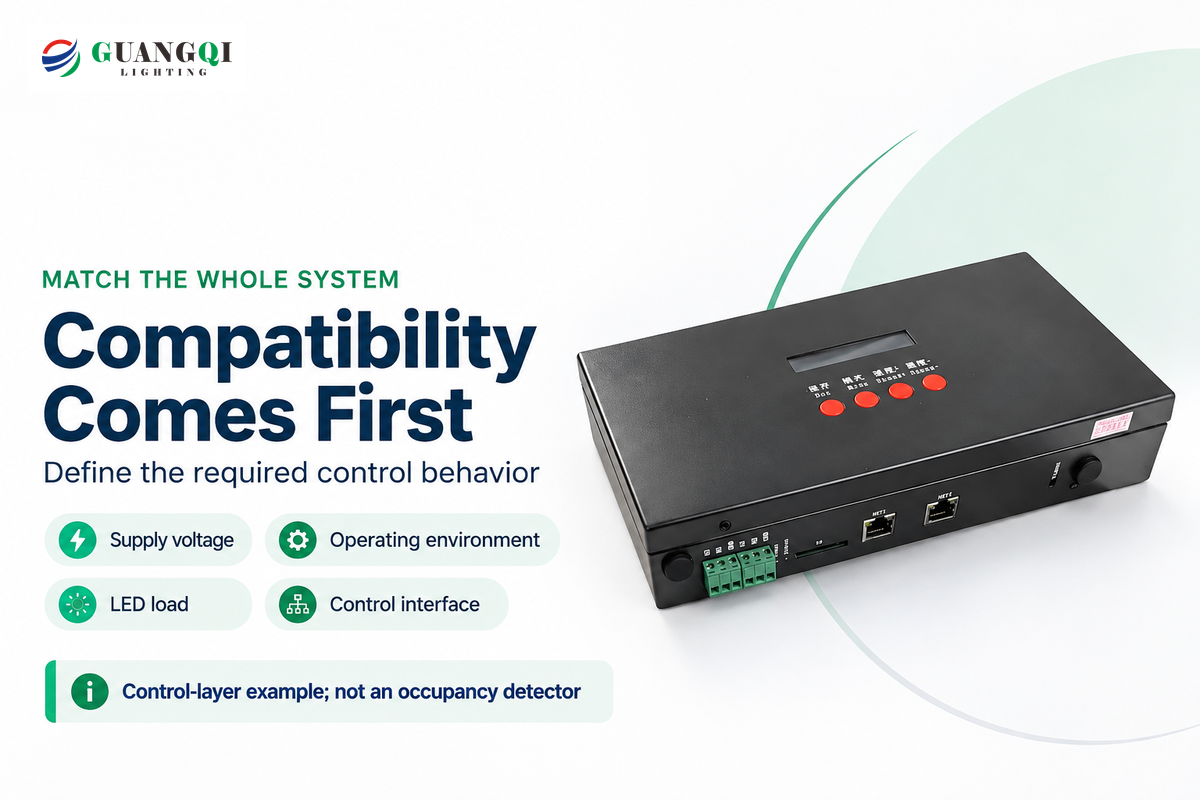
Compare optional features only after matching supply voltage, operating environment, LED load and control interface. A relay that switches a lamp is entirely different from a dimming controller or a network input device. Indicate whether the required end result is Off/On, reduced standby brightness or a coordinated response among several fixtures.
Read load labels closely. Leviton’s FAQ has 150 W LED ratings for some Decora models and 600 W for IPS15/IPV15; incandescent ratings differ. Neutral wire requirement varies across the family. A wattage rating for incandescent load can’t be a substitute for a permitted LED load and/or the driver’s switching characteristics.
Likewise, RAB’s STL360 is a separate outdoor detector with a 120 V AC supply and wet location listing. Its published 1000 W incandescent rating should not be relabeled as an LED rating. The fixture and its driver still need a compatible switching arrangement.
Resolve compatibility and then choose CCT and brightness for the task. Selectable CCT, such as a 4000K option, changes the light’s appearance rather than detection. A wall pack or canopy light can need a different distribution from a residential floodlight. An IP65 enclosure claim, a 180° detection angle or a 270° marketing claim addresses a different property; none of them replaces the others.
For networked controls, IEC 62386-303:2017+AMD1:2024 covers input devices delivering occupancy information. The DALI Alliance’s standards overview separates occupancy sensors in Part 303 from light sensors in Part 304. Specify the required devices and system behavior; citing a standard does not establish certification of a supplier or product.
Present the supplier with the room or site plan, the mounting height, the occupied activity, the supply, the details of the LED-driver, and the required control sequence. Guangqi’s lighting-control systems and LED control options provide some ideas for a control system. For an initial order, make acceptance depend on the matched fixture-and-control sample operating in the intended application.
Frequently asked questions
The right motion sensor light depends on the task and control sequence. Separate everyday buying questions from installation setting questions, using the responses below. For a commercial order, retain the model-specific supply, load and environmental requirements alongside the sample-test result so a later substitution does not change the intended behavior.
What is the most reliable motion sensor light?
The most reliable choice is the one tested for your occupied task and location.
A wide outdoor field may suit an approach route while missing quiet activity at a workbench. Compare coverage at the planned height, environmental suitability, manual override and access for service. For a sample trial, include entry from both directions and the least visible occupied position. Choose a product that passes those checks rather than one with the longest advertised reach.
Do motion sensor lights use electricity when off?
Wired controls usually need power while the lamp is off; the amount is model-specific.
The detector and control electronics must remain available to receive the next event. Read the standby-power specification separately from lamp wattage. Some manufacturers state overall control consumption rather than off-state consumption, so those figures need different interpretations. For a low-wattage lamp used briefly each day, continuous control energy can be a meaningful part of the total.
Can you put a motion sensor on any light?
No. The sensor must match the supply, load, driver and required control method.
An external switch may operate a compatible fixture, while dimming needs the correct driver interface. Some switches require a neutral connection; others use a different arrangement. Integrated fixtures may not support a separate sensor retrofit. Have the installer review the exact device instructions and circuit before specifying parts, particularly when converting an older incandescent installation to energy-efficient LED lights.
Do motion sensor lights have cameras?
A motion detector does not require a camera; some combined security products include one.
Check the product’s actual functions. A PIR or microwave detector can trigger lighting without recording images. A camera-equipped security fitting adds separate recording, network and privacy choices. Don’t infer camera capability from the words motion activated lights.
Do motion sensor light bulbs work through glass?
Do not assume a sensor bulb will detect movement through the glass of an enclosed fitting.
The enclosure changes the sensing conditions, particularly when a PIR detector needs a clear view. Choose a bulb approved for the fixture and test it with the cover installed. Where reliable detection outside the enclosure matters, a separately positioned compatible detector can be a better arrangement.
Can motion sensor lights be set to stay on?
Some models offer a manual override or maintained-on mode; others do not.
Follow the named product’s switching sequence and reset behavior. An override may expire automatically or reset at dawn. For work requiring continuous illumination, select a control with an explicit maintained-on function rather than repeatedly retriggering a short timer.
Why does my motion sensor light keep coming on?
Repeated detection or an unintended control mode can keep restarting the light.
Observe what happens immediately before activation. Check the detection boundary, sensitivity, aiming and daylight setting, then inspect any override or linked control. Adjust one cause at a time. If the lamp flashes rather than completing a normal timed cycle, include supply and driver compatibility in the diagnosis.
Planning a commercial installation? Send the application, supply, mounting height and desired control sequence to discuss a matched lighting system. A tested sample should settle coverage and control behavior before the full order.
Model examples describe the named manufacturers’ published specifications. Application recommendations are a synthesis of lighting-control recommendations. The cost ladder uses an explicitly defined example, not measured savings for a Guangqi product.
References & Sources
- U.S. Department of Energy: review of occupancy-sensor test methods, 2020
- U.S. Department of Energy: wireless occupancy-sensor guidance
- PNNL: Presence Detection in Connected Lighting Systems, 2022
- PNNL Building America Solution Center: lighting controls for multifamily buildings
- California Energy Commission: 2025 NRCA-LTI-02-A acceptance-test reference
- IEC: 62386-303 consolidated edition with 2024 amendment
- DALI Alliance: IEC 62386 standards overview
- U.S. Energy Information Administration: Electric Power Monthly, Table 5.3